@evanseech
A checklist of Meta ad settings the creator turns off by default because they waste or distort spend: Audience Network/Threads/Messenger plus the "allow limited spending to excluded placements" box (ad set level), and at ad level "Related media", creative enhancements (including enhanced CTA and relevant comments), multi-advertiser ads (for video) and dynamic creative.
198k plays · 30 Jul 2026
What they said
Ad set level:
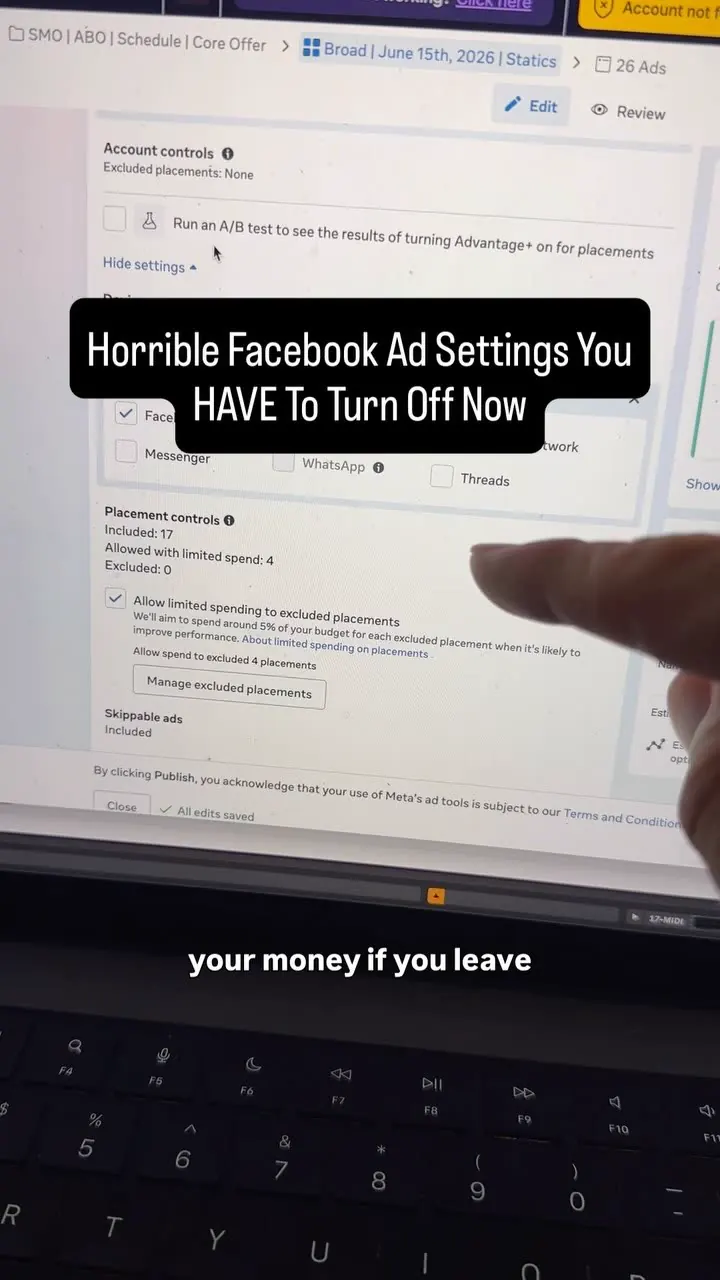
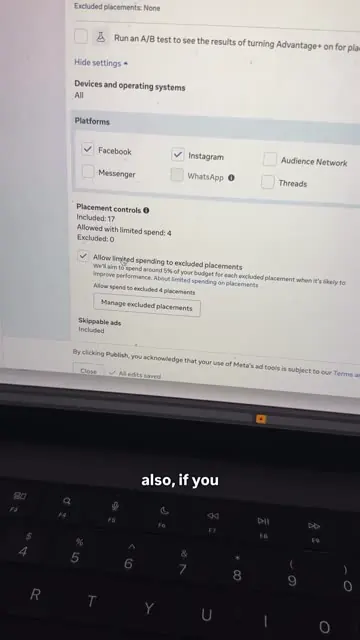
- Turn off Audience Network, Threads and Messenger placements ("that's a given").
- Also turn off the pop-up/checkbox "Allow limited spending to excluded placements". Reason: if left on, Meta still spends a small portion of budget on those excluded "awful placements for no reason whatsoever". Creative level:
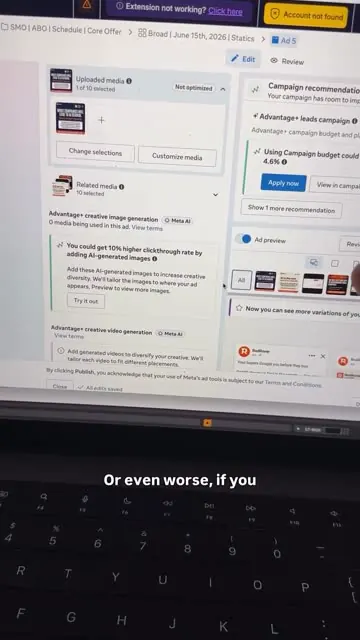
- Related media: turn it off. It serves other ads (possibly a different offer or funnel type) next to yours, sometimes as a rotating carousel. Worse, with a video ad it sometimes takes the video's thumbnail still image and serves that as the ad instead of your video. "Hit this and turn all those off."
- Enhancements: scroll to Enhancements, click Edit and turn off all of them ("garbage") plus several lower ones. He switches off "enhanced CTA" and "relevant comments"; he used to keep relevant comments on but now turns it off because it can highlight spam or negative comments.
- The only enhancement he sometimes keeps on: "reveal details over time" when the ad is a video.
- Multi-advertiser ads: turn off for video, because it serves your video in a sequence with about three other advertisers and cuts it off at five seconds every time. For static ads he sometimes keeps it on.
- Dynamic creative: used to love it, now turns it off all the time and runs individual ads instead ("like you'd see over here").
- Frames: ad set Placements (Platforms Facebook/Instagram ticked; Audience Network, Threads unticked; Placement controls "Included 17 / limited spend 1 / excluded 4" style summary; the "Allow limited spending..." tick), creative editor with "Related media" and "Advantage+ creative image generation" suggestions ("could get 10% higher clickthrough rate by adding AI-generated images" appears in the UI), an "Enhancements" panel with preview phones showing "Adjust brightness and contrast", "Reveal details over time", "Show spotlights"; format section with "Multi-advertiser ads"; and the Budget & Schedule section with "Dynamic creative" toggled off. A banner mentioning a "Broad | June 15th, 2026 | Static" ad set and 26 ads is visible.
- Creator replies in comments: to remove Marketplace, go to Placements at ad set level and toggle off Marketplace entirely (and Audience Network); turning off some platforms "could potentially" raise CPM; settings are at ad set and creative level and vary slightly per account.
Try this
- Anyone running Meta ads: At ad set level, turn off Audience Network, Threads and Messenger. Also untick "Allow limited spending to excluded placements", or Meta will still send a small share of budget there.
- Anyone running Meta ads: At ad level, switch off Related media, creative Enhancements (including enhanced CTA and relevant comments), and Dynamic creative. Run separate ads instead so you can see which one works.
- Video advertisers: Turn off Multi-advertiser ads for video. The creator says it plays your video in a sequence with other brands and cuts it at five seconds. The one enhancement he sometimes keeps for video is "reveal details over time".
- Brands with exact product looks: Enhancements can change brightness, contrast, music or crops. Turn them off if colour accuracy matters, such as metal tone, fabric or packaging.
- Agencies: Turn this into a pre-launch checklist and an onboarding audit finding ("we found seven default settings leaking budget"). Check again after publishing and after duplicating campaigns, because settings can reset. Options vary slightly by account.
Links
- Meta Ads Manager (ad set placements; ad creative editor: Related media, Enhancements, Multi-advertiser ads, Dynamic creative).
- A Chrome extension banner "Extension not working?" is visible (cosmetic). No outside link.
Watch the original
Watch the full reel on Instagram by @evanseech. Follow them for more.
Video, voice and ideas belong to @evanseech. Shown here as a short preview with our own summary, for commentary and education. Want it removed? Tell us.
00:00
/
00:00
Liked this one? Get the next
When I find a reel worth acting on, you get the short version: what it says and what to do. Free, rare, one click to leave.
Rather have it done for you? Work with Tanish