Meta ads
@socialmasla
For lead-gen campaigns, remove Audience Network, Threads and Messenger in ad set Placements (keep Facebook and Instagram), then use the Breakdown > Placement view to cut whichever placements do not perform; he blames Audience Network for "trashy leads".
442k plays · 11 Aug 2026

What they said
Steps as he gives them:
- When you make a campaign, go to the ad set level and scroll all the way to the bottom to the Placements section.
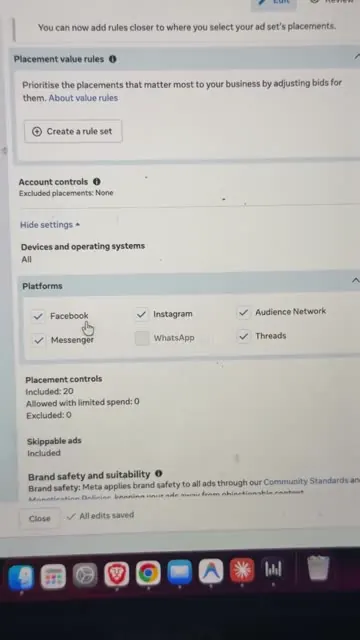
- Click "Show more settings"; the Platforms option appears.
- Keep Facebook and Instagram selected. Do NOT select Audience Network, Threads or Messenger.
- Reasoning: "all the trashy leads in the world come from Audience Network"; he does not even know who uses Threads; and if your lead comes from Messenger it is "useful to nobody".
- To see where leads actually come from, click Breakdown and choose Placement (in the results table) to see which platform is performing and which is not.
- Rule: whatever is not performing, remove it, "kill it immediately".
- Screen recording details: the ad set edit page shows a banner "Value rule creation is changing", Placement value rules, Account controls, Platforms checkboxes (Facebook, Instagram, Audience Network, Messenger, WhatsApp, Threads). After he unticks, the Placement controls panel changes from "Included: 20" to "Included: 16, allowed with limited spend: 1, excluded: 3" and a ticked option "Allow limited spending to excluded placements" is visible. A "Run an A/B test to see the results of turning Advantage+ placements off" prompt and a note that Advantage+ placements gives "12% lower cost per result" appear in the Meta UI.
- The reporting table (about 36-48s) is Ads Manager with columns including Frequency, Link clicks, Amount spent, CPC and "Columns: FunnelBreakdown", then Breakdown > By delivery > Placement/Platform. The ad set rows read "Radha - Aug - Offline" and "Latasha - Aug - Offline" (client names look like campaign labels), "Results from 147 ad sets". The CPM column by placement is visible (approx Rs 31, 34, 62, 60, 44, 81, 236 for Facebook placements such as profile feed, Reels, Stories, feed, in-stream, Marketplace; Rs 5 to 36 for Instagram feed, Explore, Reels, Stories); the exact row alignment is hard to read.
- The reel shows a CPM table but does not show lead quality or cost per qualified lead by placement; his claim of "trashy" Audience Network leads is not backed on screen.

Try this
- Anyone running Meta lead or sales campaigns: At ad set level, scroll to Placements, click "Show more settings", and keep only Facebook and Instagram ticked. Untick Audience Network, Threads and Messenger as a starting test.
- Media buyers: Open Breakdown > Placement in Ads Manager to see where results come from. Judge placements by cost per qualified lead or per delivered order, not CPM or cost per lead, because cheap clicks can hide poor buyers.
- Test properly: Duplicate your best ad set, exclude the weak placements, run it for 5 to 7 days, and compare cost per real outcome against the original. Check whether the "allow limited spending to excluded placements" box is ticked, since it lets spend leak back.
- Agencies and freelancers: Use this as step one of any account audit, and as a sales hook for lead-gen clients: "why your Meta ads attract cheap clients".
- Creators: The "one setting plus one rule" screen-recording format is easy to copy for any tool you know well.
Links
- Meta Ads Manager (ad set > Placements > Platforms; Breakdown > Placement).
- No external tool or link.
Watch the original
Watch the full reel on Instagram by @socialmasla. Follow them for more.
Video, voice and ideas belong to @socialmasla. Shown here as a short preview with our own summary, for commentary and education. Want it removed? Tell us.
00:00
/
00:00




Liked this one? Get the next
When I find a reel worth acting on, you get the short version: what it says and what to do. Free, rare, one click to leave.
Rather have it done for you? Work with Tanish