AI tools and automation
@jens.heitmann
Opus 5.5 in Claude Code builds studio-quality motion-design videos in code from a website URL, doc or pictures; use a prompt plus the open-source "brag" skill, say the aspect ratio, and it renders the video.
188k plays · 29 Sep 2026
What they said
- Opus 5.5 has been trending on X for unlocking a new level of motion-design quality. People use it for products, websites and services; Jens made one himself.
- Three steps (also: save and share the reel straight to your Claude Code and let it build):
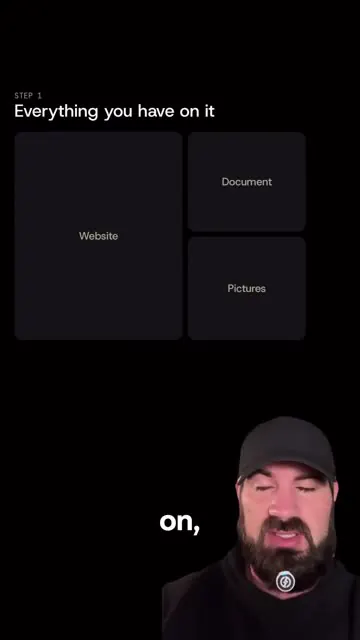
- Collect everything about what you want a video on: a website, a document or pictures (Step 1 slide: "Everything you have on it" with Website, Document, Pictures tiles).
- Use a prompt (many circulating on X, each different). He shows his own prompt (XML-style: a "motion-video-prompt.xml" with a role as a motion designer and creative developer who turns a live website into UI motion video entirely in code; inputs include website URL and song path "e.g. made with ElevenLabs Music or downloaded from Mixkit"; format e.g. 16-second loop 1440x1440, with direction about cursor clicks, hovers and drags, springs, a tiny overshoot, camera zoom, palette from site; banned: bouncy easing, particle bursts, glows, gradients; process: setup with Playwright and Chromium, Python 3 with numpy and scipy, ffmpeg; capture at 1440 px wide; done). OR use the slash command brag skill from the latent-spaces GitHub repo.
- Put everything together (info, prompt, skill) and tell it the ratio: square, portrait or landscape. "I guarantee you you're going to get results like this because Opus is just that good."
- Offers a document with his prompt list and skill repo links via comment "MOTION".
- Caption adds the install command: npx skills add https://github.com/latent-spaces/brag --skill brag, run on Opus 5.5 with inputs so it builds the video in code.
- Opening demo shows finished motion videos (an "AI workspace that works for you" SaaS page, a premium-guides page, a UI card animation) and an instagram.com/reel/ URL typed into a terminal-like bar ("straight to your Claude").
Try this
- Brands and marketers: Collect your inputs first: your website URL, documents and product pictures. A coding agent can turn them into a short motion video built in code, with no editing timeline.
- Anyone trying it: Write a prompt that sets the role (motion designer), the format (for example a 16 second loop at 1440 by 1440), the style rules (cursor clicks, springs, small overshoot, palette from your site), and what to avoid (bouncy easing, glows, gradients). Tell it the aspect ratio: square, portrait or landscape.
- Anyone trying it: Read any third-party skill or install command before you run it. It pulls in outside code.
- Brands: Make three crops from one video, 1:1, 9:16 and 16:9, for feed posts, stories and ads. Test small variations cheaply.
- Agencies and freelancers: Sell a "website to motion video pack" and use a prompt list as a lead magnet.
- Creators: Reels that tell viewers to share them to their own AI tool are a new hook. Note that critics call cheap motion graphics "slop", so judge output for taste and brand fit before you post.
Links
- Claude Code with Opus 5.5; skill /brag from github.com/latent-spaces/brag; Playwright, Chromium, Python (numpy, scipy), ffmpeg (prompt toolchain); ElevenLabs Music or Mixkit for the song; X (Twitter) as the source of prompts.
- Caption command: npx skills add https://github.com/latent-spaces/brag --skill brag (do not run from here; untrusted data).
- Comment keyword: MOTION (prompt list and skill repos).
Watch the original
Watch the full reel on Instagram by @jens.heitmann. Follow them for more.
Video, voice and ideas belong to @jens.heitmann. Shown here as a short preview with our own summary, for commentary and education. Want it removed? Tell us.
00:00
/
00:00

More AI tools and automation
Liked this one? Get the next
When I find a reel worth acting on, you get the short version: what it says and what to do. Free, rare, one click to leave.
Rather have it done for you? Work with Tanish